Expense Tracking on iPhone Duo, iPad and Foldables: 4 Apps Compared
On a bigger screen, does your expense tracker just stretch the phone layout — or actually use the space?
iPhone Duo is Apple's first foldable: a phone when closed, close to a small tablet when open. Add iPad, Android tablets and the foldables from Samsung, Google and others, and a growing share of people check their spending on a big screen.
Most expense trackers were designed for a phone held upright. On a larger screen they either float a phone-sized window in the middle, or stretch a single list across the width and leave the rest empty. This guide looks at what four apps do on big screens, using only what can be checked publicly.
Three things to check on a big screen
• Is there a native iPad app? An iPhone-only app runs on iPad in iPhone compatibility mode — a phone-shaped window, scaled up or centred. The App Store's public data shows which apps are universal.
• Does the extra width get used? Two native apps can differ a lot: one stretches the phone layout, the other rearranges into columns.
• Is it still comfortable folded? A foldable opens and closes many times a day. Folded, it should feel like the phone layout you know, not a shrunken tablet screen.
How four apps compare
App
Native iPad app
Unfolded iPhone Duo
Big-screen layout
Penvo
Yes
Three columns: ledgers · entries · stats
Three columns on wide screens, two on narrower ones; the same on Android tablets and foldables
YNAB
Yes
Not verified
Not verified
Splitwise
Yes
Not verified
Not verified
Spendee
No (iPhone only)
Not verified
iPhone compatibility mode on iPad
"Native iPad app" comes from public US App Store data (universal app or not, iPad screenshots provided), checked on 2026-10-11 against YNAB 26.38, Splitwise 26.9.1, Spendee 6.0.8 and Penvo 4.8.0. iPhone Duo has not started shipping, so how the other apps behave on it cannot be verified yet. YNAB and Splitwise have iPad apps, but we found no public description of how many columns they use.
Penvo on iPhone Duo
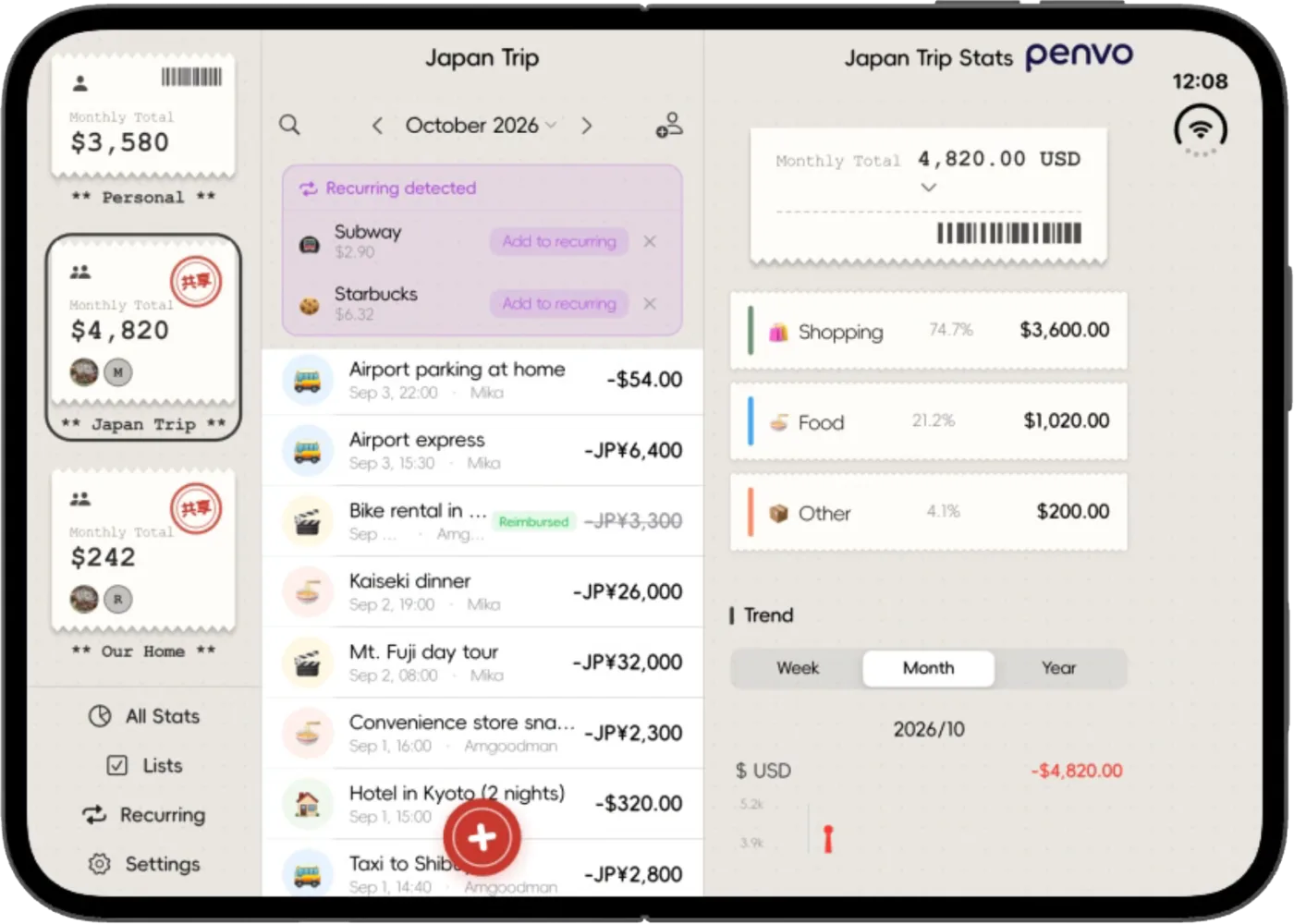
Unfold iPhone Duo and Penvo lays itself out in three columns. On the left, every ledger as a card — personal and shared — with this month's total on each, plus shortcuts to overall stats, lists, recurring bills and settings. In the middle, the entries of the selected ledger, with month switching, search and member invites. On the right, that ledger's stats: the monthly total, category breakdown and trend chart.
The columns move together. Pick a ledger on the left and the middle and right follow; step back a month in the middle and the stats on the right step back too. What used to mean flipping between an Entries tab and a Stats tab now sits on one screen.
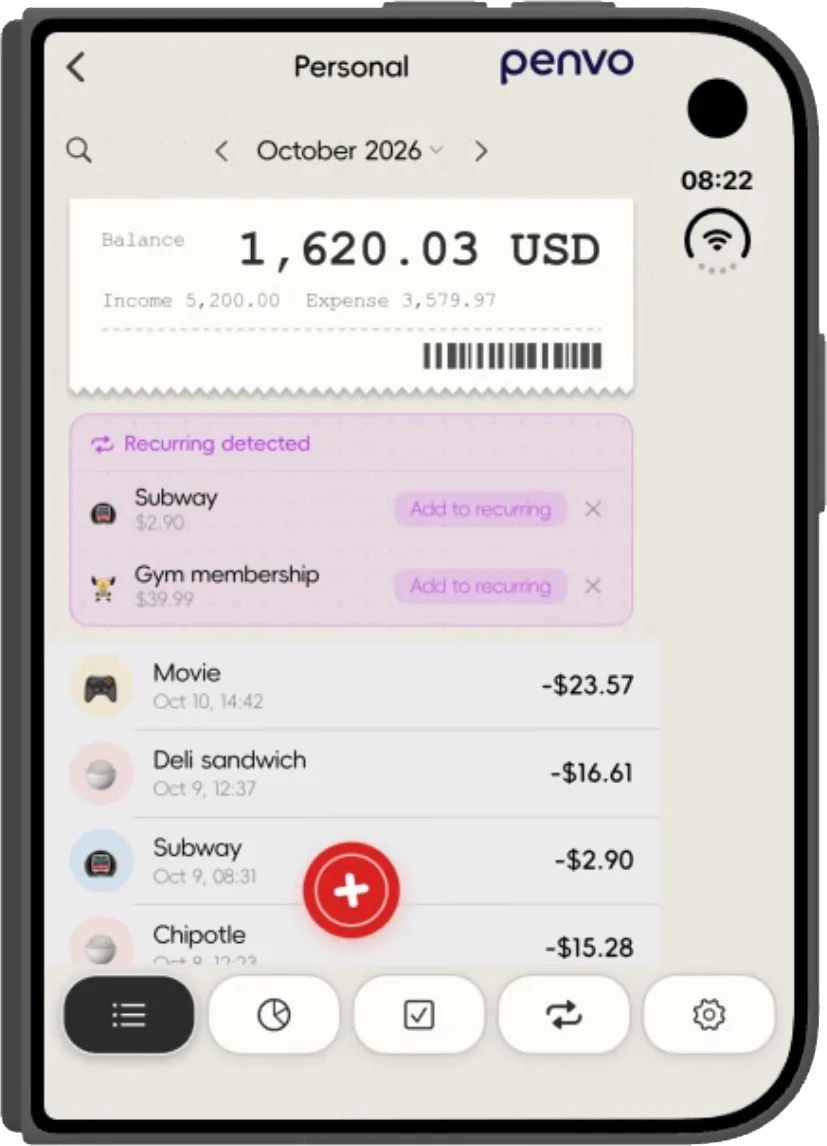
Fold it and you are back to the phone layout: ledger cards in two columns and the tab bar at the bottom — home, stats, lists, recurring, settings — ready for one-handed logging.
Unfolded: ledgers, entries and statsFolded: back to the phone layout
iPad, Android tablets and foldables
The columns are not a Duo special case — they follow the screen width. Wide enough, you get three columns; a little narrower (an 11-inch iPad held upright, for example), two columns, with stats moving into the left column as an entry; phone width keeps the single column.
The same layout is switched on for Android tablets and foldables, and it follows rotation.
It is not just the home screen. Settings opens as a large window laid out in columns, and budgets, category management and the user guide use two columns on wide screens, so text never runs the full width of a tablet.
Which one to pick
• On iPhone Duo, iPad or a foldable, and you want ledgers, entries and stats side by side: Penvo.
• Sharing a ledger with family or roommates — switching ledgers on the left while the stats update on the right is where three columns help most: Penvo's shared ledgers.
• Already on YNAB or Splitwise: both have native iPad apps; check how they look on Duo once it ships.
• Spendee is iPhone-only today and runs in compatibility mode on iPad.
The difference on a big screen is not whether an app installs — it is whether the extra space gets used. Of the four, Penvo is the only one we could confirm is already adapted for iPhone Duo.